

🚀 New: Chatbot in the admin, richer client information and monthly accounting exports
Dear partners,
we’ve got another batch of news from Booqito’s development. We’ve improved the admin, added a new helper and made working with orders and accounting easier. 👇
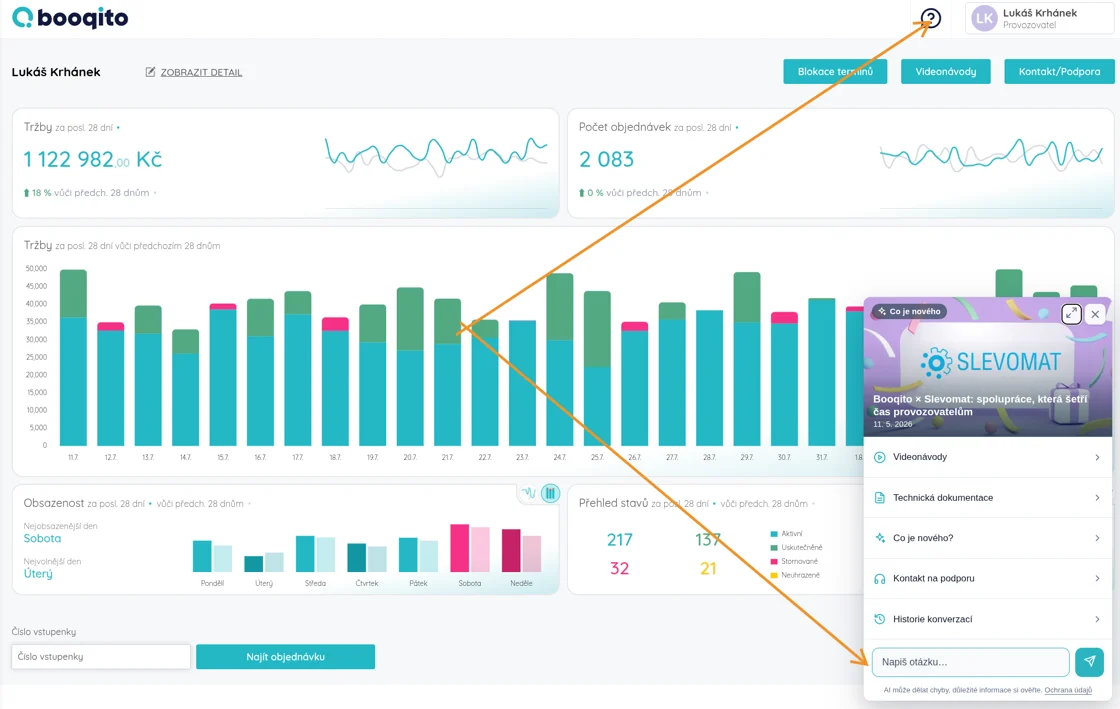
🤖 New chatbot – a helper right in the admin
You’ll now find a chatbot directly in Booqito that advises you and points you in the right direction. And it’s not alone – you have everything you need in one place:
- ✅ Chat that advises and answers your questions
- ✅ Booqito documentation, video guides and support contacts
- ✅ You can download the documentation and look up whatever you need
- ✅ The latest news from Booqito
👉 Turning it on takes a single click and the chatbot works on mobile too – no need to worry about missing anything.
📝 Richer information from the client
If your service requires it, we can now add more information to the booking step that you need to collect from the client.
- ✅ At booking, the customer can confirm required or optional fields
- ✅ You can attach a link to a field — for example to your terms and conditions, rules of operation or a PDF document. The checkbox can then serve directly as a link to your T&Cs.
- ✅ We’ve also adjusted the Information text field for longer text answers
If you’d like help setting anything up, just reach out. 🤝
🎟️ Orders for passes and vouchers straight from the admin
You can now create and order passes and vouchers directly from the Booqito backend – much easier for phone or email orders. It now works through the calendar too.
📊 Accounting and documents
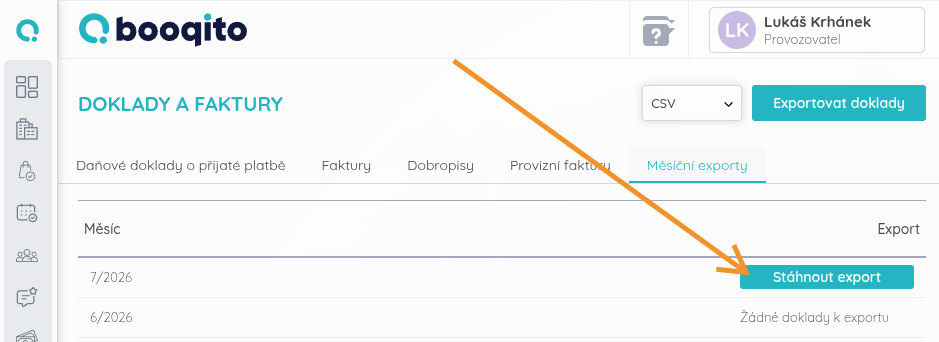
- ✅ Improvements to document records and accounting
- ✅ New monthly exports to download – you can download your accounting records directly from the admin
🎨 Look and controls (UX/UI)
- ✅ The calendar remembers your settings – view (day/week), branch, activities and staff. When you leave the calendar and come back, everything stays just as you set it.
- ✅ New “Employee” role – an employee only sees their own orders, not the revenue or other people’s contacts. Ideal wherever several people work together and sensitive data should stay separated. If needed, an existing branch manager can easily be downgraded to the employee role.
💡 Tip: You can add Booqito to your phone’s home screen as a shortcut instead of an app or a browser bookmark. Just open Booqito in your mobile browser, tap the browser menu and choose “Add to Home Screen”. You’ll then have Booqito at hand like a regular app.
✨ And what else to look forward to
👉 We’re preparing a clearer look for the admin – we believe it will make working in Booqito even more pleasant.
👉 We’re getting ready for EET 2.0 – and thanks to Booqito you’ll have it handled automatically, worry-free.
🤝 Partner Program
Do you know businesses in your area that could benefit from Booqito? Join our partner program and earn a commission for every new client you recommend – up to 4,000 CZK.
Thank you for being with us 🙏
If you have any questions, we’re of course here for you. We’re constantly working to make Booqito as intuitive as possible and your business run smoothly. Have an idea for a further improvement? Let us know – many of our updates come from your suggestions.
Best wishes for smooth reservations,
The Booqito Team
Did you like the article?
Subscribe to our newsletter and receive similar articles directly to your email.